Q: Do I need any special software to sign up for this E-Bill
Express payment service?
A: No special software is required to use this service. You will
only need web access and your browser.
Q: After enrolling in this payment service, when can I start
paying my bills?
A: After you complete and submit the enrollment form and
respond to the activation e-mail, we will start your service
immediately. You can then access the service to pay a current
invoice or view past invoices. You should begin receiving an
E-Bill notification within a month or so, depending upon the
billing cycle.
Q: What if I forget my password?
A: The initial screen provides the ability for you to have your
password e-mailed to the e-mail address used when you
enrolled.
Q: How am I billed for this service?
A: There is no cost for enrolling in and using this payment site.
See the service Terms and Conditions for complete details.
Q: How do I cancel this payment service?
A: To cancel log in and click Un-enroll or you may contact our
customer care department. Click the “Contact Us” hyperlink on
the web page for contact information.
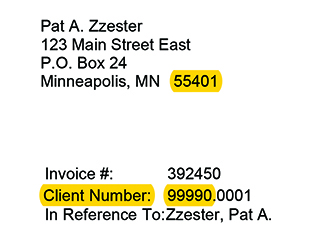
Q: Where can I find my account number?
A: You can find your account number on a recent paper
invoice.
Q: If an account is in a name other than my own, can I still
sign up for E-Bill payment service?
A: Yes, but please be sure to use the correct account number
as it appears on the monthly paper invoice.
Q: Will I receive a reminder that I have an E-Bill ready for
viewing and paying?
A: You will receive an e-mail notification reminding you that an
E-Bill has been uploaded and is ready for payment.
Q: How long does it take to receive a new E-Bill?
A: Once you enroll your most recent invoice is available
immediately.
Q: Will I still receive a paper copy of the bill through the U.S.
mail?
A: No. If you need to receive a paper copy, please contact
Accounts Receivable.